Hands-On-Review: Motorola PIP1610 Baby Monitor


Having a child in the home is one of the greatest gifts one could ever experience. It is also exceptionally important to be able to see what is happening in the room your child spends so much time. From the moment you bring baby home to the day they finally want their privacy, its important to have the best quality view of everything going on. Today I will be reviewing the Motorola PIP1610 Baby Monitor. There will be some slight comparisons to another monitor system that I have/used but will only be used as a comparison and not to degrade the other type.
Overview
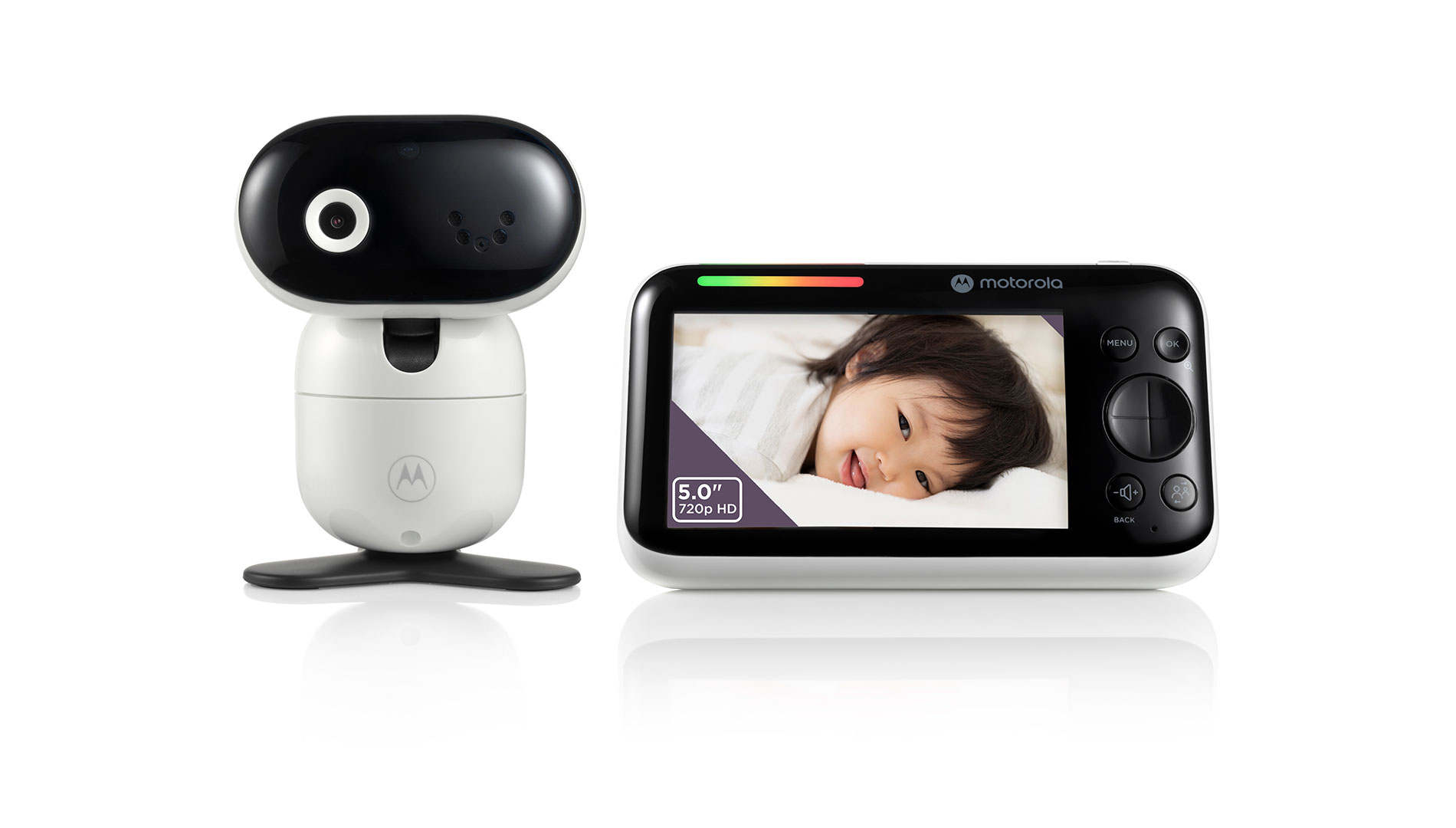
The PIP1610 comes with the whole set up. You open the box and find your new pan, tilt, zoom camera, monitor with a whopping 5 inch screen, power cords and wall mount. The monitor is large and in charge but balanced at the same time. It has an extendable antenna which I feel actually helps with reception, a beautiful display, large buttons that are easy to click in the dark and a balanced stand that allows it to hold itself up. The camera is also a powerhouse figure for sure. The base stand is built for excellence and able to maintain the camera very well no matter what angle you move it, the power cords are long enough to reach the distant plugs that are never right where you need them.

Features
The features on the PIP1610 are by far the best I have ever seen in any baby monitor. I will list them below and go into a little more detail on the ones that I feel deserve the most attention.
Parent Unit
- 5.0” IPS color display with HD 1280 x 720px resolution
- The screen quality is fantastic! The clarity gives you such detail that you can clearly see if your baby is awake or not. I was never able to actually see if my Son’s eyes were open or closed in previous videos until we got this monitor.
- 2800 mAh battery on parent unit
- They boast about 6 hours of battery life on this rechargeable battery. I can confirm we were getting roughly 6-8 hours of battery life while leaving the screen off unless we were using it.
- Two way intercom
- One of my favorite features on this! Another monitor we have also has this feature, however, the microphone never works correctly and its always so distorted you can’t hear anything. With the PIP1610 I am now able to tell my son goodnight when I am away working for my 24-48 hour shifts and he has learned to look up and respond as well!
- Room temperature monitoring with alert
- This has been a nice addition to have. We have’t had any alerts go off for temperature thankfully. I will say that the temperature is generally off very slightly. We use a Google Nest temperature sensor to ensure the room is always cooled properly.
- Low Battery/Out Of Range Alert
- This works extremely well! The monitor does a very annoying loud beep sound that lets you know no matter what you are doing that the monitor is out of range. We had to go way into the backyard for this to happen. The range has been amazing being able to go in the yard, on the deck and around the house without losing our signal.
- Sound level indicator
- Helpful when your baby is in the process of self soothing and your heart can’t handle hearing their cries. Turning the volume down for a couple minutes but still being able to see the light up sensor showing they are still having a rough time is extremely nice.
Baby Unit Camera
- Pan, Tilt and Zoom capabilities
- This is by far one of the best features I have ever seen. We are able to see every single inch of his room from floor to ceiling and left to right. This is easily controlled with the Parent Unit or on your phone. My one complaint about this is on the phone app. In order to use the PTZ feature you have to actually full screen the monitor. It’s not a make or break deal but it is slightly annoying at times when I want to quickly move around.
- Soothing lullabies, audiobooks and personal recordings
- The camera has 10 different lullabies, 10 different audio books and the ability for you to record your own audio to be played whenever you want. The audio is very clear and easy to hear. You can control the volume from your phone or the parent unit. It’s definitely a nice feature to have if you don’t have a white noise machine or you want a different way to help soothe.
- Two-way talk with high-sensitivity microphone
- I love this feature so much I am mentioning it twice. You can do this from the parent unit or from your phone and its perfectly clear no matter what device you use. The other nice part is that you can hear audio from the camera the same time you’re talking so you aren’t missing out on responses.
- Wi-Fi enabled to enjoy up to Full HD (1080p) video using the Motorola Nursery app
- Infrared night vision
- The night vision is extremely crisp and clear. This provides such an excellent vision that you can even see if baby’s eyes are open when you think they’re sleeping.
- Up to 1,000ft (300m) range
Motorola Nursery App
- Free of charge 24-hour event monitoring and streaming
- This is one of my favorite things. The camera will detect motion or sound and begin recording so even if you aren’t actively watching, you can review a video of what happened after the fact. You can also download the videos/pictures right to your phone to keep forever.
- Motion, sound and temperature detection with notifications
- This goes hand in hand with the video event monitoring. When an event happens, a vide is recorded showing you exactly what happened.
- Take photos and videos direct from the live stream
- If you are watching live and want to snap a quick shot the camera button is dead center and easy to use. If you want to record a video, just hold the camera button and it automatically records for you.
- Share events, photos and videos with friends and family straight from the app
- Baby’s journal to track their development
- This feature would be perfect for anyone with a new baby in the home. This allows you to track feedings, bottle or breast, and track how much they drank, which side they drank from, diaper changes, and so much more!

Summary
Overall this monitor has been a blessing for our home. Having the full PTZ feature to move around the entire room and see every thing happening is incredible. The recording feature is so nice because you never have to worry about missing a thing. A couple minor complaints that I have are that sometimes the monitor will not detect the camera and will begin beeping very loudly. This happened a few times even being one room away from the monitor. All we had to do is restart the monitor and everything worked. The other issue I have is on the app itself. In order to use the PTZ feature and get the full view you have to select the full screen option on the video screen. It is not a horrible process but it is just an extra step to get to the full view and capabilities. Very minor complaints and issues if I’m being completely honest. Besides that, everything has been amazing. The speaker feature is so nice and loud, allowing me to talk to my wife and son while I am away on my 24 hour shifts in the Fire House.
If you are looking for a monitor for your home and baby this is by far the top of my list. We will be expanding with a second camera in the near future once we begin working on baby number 2 and will absolutely be using the baby journal during that time too. Head over to Motorola and order yours today!