

For years, the keyboard industry forced us into a binary choice: drag a three-pound mechanical behemoth into the office that demands its own seat on the train, or accept the mushy, zero-tactility experience of a laptop keyboard that feels like typing on a wet napkin. Neither option is particularly conducive to a professional image, unless your goal is to be known as the person whose briefcase doubles as a workout weight.
Enter the Epomaker Luma100.
Enter the Epomaker Luma100. Priced around $98.99 USD (as of Aug 1, 2026) against an MSRP of $119.00 USD, this board attempts a difficult engineering feat: a 96% compact ANSI layout in a lightweight anodized aluminum chassis. It offers only 3-pin and 5-pin low-profile switches; this should be clearly stated. QMK/VIA customizability and tri-mode wireless connectivity, all while maintaining the dedicated number pad essential for anyone whose job involves more than just checking emails.
I spent several weeks using the Luma100 across various professional environments. Here is a definitive breakdown of how this low-profile contender manages the balance between enthusiast features and office-appropriate restraint.
Technical Specifications at a Glance
| Feature | Specification |
| Brand & Model | Epomaker Luma100 |
| Layout | 96% Compact Layout (100 Keys ANSI US) |
| Case Material | CNC Anodized Aluminum |
| Switch Options | Need to be changed as Epomaker Mint Low Profile switch |
| Mounting Style | Low-Profile Gasket-Mount Structure |
| Keycaps | Double-shot change to DSA Low-Profile PBT with Translucent Pass-through Legends |
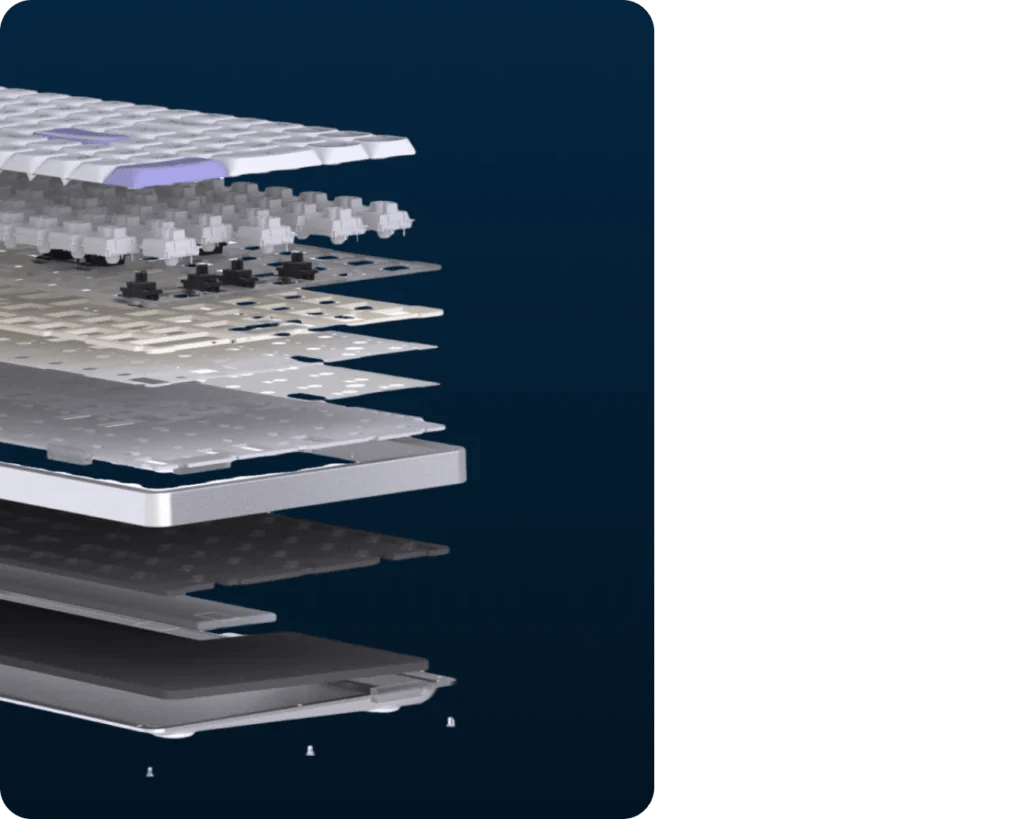
| Acoustic Padding | 5-Layer Stack (Sandwich Foam, Switch Pad, Sound Film, Socket Foam, Bottom Foam) |
| Connectivity | Tri-Mode: USB-C Wired, 2.4GHz Wireless, Bluetooth 5.0 (Up to 3 Devices) |
| Polling Rate & Latency | 1000Hz (4ms wired / 12ms 2.4GHz), 125Hz (24ms Bluetooth) |
| Battery Capacity | 3,000 mAh Rechargeable Lithium-ion |
| Lighting | North-Facing Per-Key RGB + Custom Accent Corner Light Bar |
| Software Support | Open-Source QMK / VIA Web Configuration |
| Weight | Approx. 0.73kg |
| Included Accessories | Braided USB-C Cable, 2.4GHz Dongle, Travel Wallet, Mac Keycaps, Switch Puller |
| MSRP | 119USD |
Design & Build Quality: Anodized Elegance Meets Mobile Ergonomics
The first thing you notice when unboxing the Epomaker Luma 100 is its striking balance between physical presence and stability. Weighing in at approximately 0.73kg, Heavy-duty desk anchor describes luma100 incorrectly. The entire paragraph can be changed to: it’s a featherweight by aluminum standards — light enough to live in a laptop sleeve, yet the CNC anodized shell gives it a rigidity that refuses to flex no matter how hard you bottom out. In my personal observation, my wrists felt remarkably strain-free even after long sessions. The keyboard is designed to stay put during frantic use, providing a reliable platform for both gaming and work.
Standout Aesthetics & Lighting
- Pass-Through DSA Keycaps: Epomaker equipped the Luma100 with double-shot DSA low-profile keycaps. Unlike standard print keycaps that leave you blind in a dimly lit room, the Luma100 features translucent legends. The crisp RGB light shines directly through the keycaps, making late-night coding or gaming effortless.
- Corner Accent RGB Light Bar: In addition to per-key north-facing RGB backlighting, Epomaker added a subtle, stylish light bar along the corner edge. It gives the board a futuristic, minimalist glow on your desk pad without looking like a neon sign.
- Thoughtful Operating System Support: Epomaker includes pre-installed Windows modifier keycaps, but bundles dedicated Mac replacement keycaps right out of the box. Switching between Win and Mac modes is as simple as hitting FN + A or FN + S.
Acoustic Engineering: Meticulous Vibration Management
Achieving a refined acoustic profile in a full-sized chassis is straightforward; there is ample room for padding. Delivering that same experience in a low-profile board under one inch tall requires significant dampening efficiency.
Epomaker achieved this by miniaturizing their signature 5-layer sound-dampening system:
- Sandwich Foam: Sits between the plate and PCB to choke out metallic ping.
- IXPE Switch Pad: Sharpens the initial finger impact sound.
- Sound-Enhancement Film: Cleanly filters out harsh high-frequency noise.
- EPDM Switch Socket Foam: Encapsulates the hot-swap sockets.
- Bottom Sound-Absorbing Foam: Prevents the aluminum case from echoing like an empty soda can.
Utilizing a gasket-mount structure, the plate effectively floats within the chassis. This results in keystrokes that are muted and refined rather than aggressive. The Luma100 is tuned to produce a subtle “thock” that signals productivity rather than starting a noise complaint in an open-plan office.
Epomaker Sea Salt Silent V2 & Creamy Jade Linear Switches
Need to be changed to Epomaker Mint Low Profile switch
It can be changed to: My unit came fitted with Epomaker’s own Mint low-profile linear switches, and they are the backbone of what makes the Luma100 workable in an office. There is no tactile bump to speak of, but the stroke stays even from top to bottom, and the gasket mount underneath keeps the bottom-out from landing like a hard stop against bare aluminum. Paired with the pre-lubed Gateron low-profile stabilizers, the longer keys — spacebar, shift, and the numpad’s zero and enter — settle with the same muted tone as the alphas instead of rattling a semitone above them.
Real-World Use Cases: Where the Epomaker Luma100 Delivers
Scenario A: The Spreadsheet Commuter
For the professional working from high-traffic environments like coffee shops or trains, space and silence are the primary currencies. Laptop keyboards often lack the numpad required for rapid data entry, and traditional mechanical boards are an ergonomic nightmare on a small tray table.
The Epomaker Luma100 slides right into your messenger bag alongside your laptop, neatly protected inside the included travel pouch. Thanks to its compact layout, you retain a dedicated 10-key numeric pad for rapid spreadsheet data entry without sacrificing mouse space. The acoustics of the Need to be changed to Mint Low Profile switches ensure you can hammer away at formulas while being substantially quieter than conventional clicky or non-silent switches.
Scenario B: The Multi-Device Orchestrator
Managing a workstation that spans an M-series MacBook for design work and a Windows PC for heavy-duty processing often leads to a cluttered desk. The Luma100 acts as a central hub, allowing for seamless device-hopping via Bluetooth 5.0 and 2.4GHz wireless without the need for multiple peripherals.
Instead of cluttering your workspace with two sets of peripherals, the Epomaker TH108 V2 Pro (Luma100)handles device-hopping effortlessly. With onboard Bluetooth 5.0, 2.4GHz wireless, and USB-C connectivity, you can pair the board to multiple configurations. Pressing FN + Q/W/E allows for switching through saved profiles instantly. Epomaker even clearly prints the shortcut functions directly on the keycaps, so you never have to scramble to find the user manual.
Software, Connectivity, & Battery Life
Web Software Customization
One of Epomaker’s best decisions with this line was utilizing web-based driver software that doesn’t require bloated installations. While QMK/VIA support is a common request, simply launch a Chrome or Edge web browser, navigate to the driver application, and plug in the keyboard to immediately remap keys, configure multi-key macros, or adjust custom RGB lighting profiles. The keymaps save directly to the board’s onboard memory chip, meaning your custom layouts follow you wherever you plug the keyboard in.
Battery Life & Polling Rates
Packing a 3,000 mAh rechargeable battery, the Epomaker Luma100 provides ample power for wire-free productivity:
- Wired Mode (USB-C): 1000Hz polling rate / 4ms latency for high-speed gaming.
- 2.4GHz Wireless Mode: 1000Hz polling rate / 12ms latency using the ultra-compact USB-A receiver dongle.
- Bluetooth 5.0 Mode: 125Hz polling rate / 24ms latency for extended battery longevity across mobile devices and tablets.
With RGB turned off or set to low brightness, you can easily get through several weeks of standard workday typing before needing to plug in the included braided USB-C cable.
Pros and Cons
Pros
- Premium Aluminum Construction: Lightweight, durable anodized aluminum case weighing under 1.6 lbs.
- Ideal 96% Layout: Keeps the dedicated Numpad and arrow keys while saving precious desk space.
- Low-Profile Gasket Mount: Shock-absorbing, comfortable typing experience that dramatically reduces wrist strain.
- QMK / VIA Compatibility: Full web-based key remapping and macro creation with zero background software bloat.
- Complete Accessory Package: Ships with a vinyl travel pouch, braided USB-C cable, Mac keycaps, switch puller, and extra switches.
- Shine-Through Legends: Pass-through keycap legends deliver excellent visibility in low-light environments.
Cons
- Flat Typing Incline: Fixed low-profile height with minimal built-in angle (though Epomaker includes stick-on feet for extra lift).
- Dense Layout Learning Curve: 96% layout places the arrow keys tightly against the numpad, which requires a short muscle-memory adjustment period.
Target Audience
The Epomaker Luma100 is built for the digital nomad, the software developer, and the financial analyst who refuses to choose between portability and a full-sized numpad.
If you appreciate the ergonomic benefits of low-profile typing but require the tactile feedback of a mechanical switch, this board is an excellent daily driver. It provides a professional aesthetic and versatile connectivity at a price point that makes it one of the more logical investments in the compact keyboard market.